Pantheon release notes

Your destination for staying informed about our latest innovations and product updates.
Subscribe to RSS feed
New feature
September 3, 2026

Version 0.9.5 of the 'Push to Pantheon' GitHub Action is now available. This release changes how the action handles a push that has no Pantheon environment to deploy to, and corrects the documentation for the target_env and target_env_strategy inputs.

What's new

A Multidev comes from a pull request. A push to any other branch has nothing to derive an environment name from.

In 0.9.4 the action treated that as an error and failed the job, so adding the action to a workflow that runs on every push would fail on a feature branch with no PR. In 0.9.5 the action skips the remaining steps and the job succeeds, and the step log records why the deployment was skipped.

A misconfiguration still fails the job: a target_env value Pantheon will not accept, an unrecognized target_env_strategy, or the branch strategy with no branch to read.

If you want pushes to other branches to deploy, set target_env_strategy: branch to deploy to a Multidev named after the branch, or set target_env explicitly. (#188)

How to upgrade to 0.9.5

Update your workflow file to use 0.9.5:

For more information about this release, see the GitHub release page. To learn more about deploying to Pantheon from GitHub, see GitHub Actions.

If you have questions or concerns about the action, please use the Push to Pantheon issue queue.
August 26, 2026

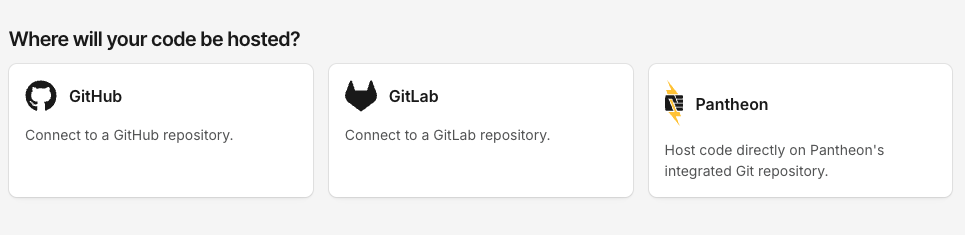
Pantheon's GitLab support for external repositories is now generally available to everyone directly from the Pantheon Dashboard, alongside GitHub and Pantheon-hosted Git.

What's new

  • Dashboard support — When creating a new site, choose GitLab as your code host right alongside GitHub and Pantheon's integrated Git repository — no Terminus required.
  • Self-hosted GitLab — Connect to GitLab.com or your own self-hosted GitLab instance.
  • Token-based authentication — Authenticate using a personal access token or group access token with api and write_repository scopes.

Where to find it

During site creation, select GitLab on the Where will your code be hosted? screen to connect your repository.

Where will your code be hosted screen showing GitHub, GitLab, and Pantheon options

For full setup instructions, see the related documentation.

August 18, 2026

Pantheon MU-Plugin 1.5.7 adds dismiss and hide controls for the Pantheon WordPress core update notice ("A new WordPress update is available!"). Apply upstream updates to get this version of the mu-plugin.

Dismiss the notice

Any user who sees the notice can dismiss it with the X in the corner. The dismissal is saved per user, so it persists across page loads and logins. The notice reappears only when a newer WordPress version becomes available.

Hide the notice

To hide the notice more permanently, or for everyone, you can:

  • Target #pantheon-update-notice (or the .pantheon-update-notice class) with CSS.
  • Return false from the pantheon_show_update_notice filter.
  • Define the PANTHEON_SHOW_UPDATE_NOTICE constant as false in wp-config.php.

For details, see Suppress WordPress Admin Notice.

August 17, 2026

What's new

You can now choose how the Pantheon Dashboard looks. Alongside the classic Light appearance, the Dashboard supports a full Dark mode, plus a System option that automatically follows your device or browser's own light/dark setting.

Pick your preference from the Theme control in your User Menu:

  • Light — the classic Dashboard appearance (default)
  • Dark — a full dark color scheme across the Dashboard
  • System — automatically matches your OS or browser's current preference, and updates live if that setting changes

Your choice is saved to your account, so it follows you across devices and browsers — no need to set it again each time you log in somewhere new. If you haven't set a preference, the Dashboard defaults to Light.

Why it matters

Dark mode reduces eye strain in low-light environments, can save battery on some devices, and matches how many people prefer to work. If that preference is already set at the OS level, System mode picks it up automatically — no extra effort required.

Where to find it

Look for the Theme option in your User Menu at the top of the Dashboard. For more details, see related documentation.

August 7, 2026

You can now update the credentials for a Custom Upstream directly from the Pantheon Dashboard — no support ticket or new upstream required. Previously, changing a private repository's access token meant either creating a new Custom Upstream and switching each site over to it, or contacting Pantheon Support.

What's new

  • The upstream Settings page now has a Repository credentials section that shows whether credentials are set and lets you update them — a GitHub personal access token or a Bitbucket repository access token.
  • The stored credential is masked and never displayed back in the Dashboard.

Changing the repository URL still requires creating a new Custom Upstream.

For steps, see Edit an Existing Custom Upstream.

August 3, 2026

As of today, an increasing percentage of newly created sites on Pantheon will use a filesystem backed by Cloud Storage FUSE for their uploaded files (wp-content/uploads for WordPress and sites/default/files for Drupal). This filesystem replaces the "Valhalla" system Pantheon pioneered for sharing files across horizontally scalable PHP containers.

Existing sites will migrate to this new filesystem over the remainder of 2026 starting on 09/01/26.

With this change, we can create and restore backups faster and more reliably.

Background

Both WordPress and Drupal were originally architected in the early 2000s for systems where developer-controlled application files (.php, .css, .js, etc.) and files uploaded by CMS users (images, PDFs, etc.) would live on the same server. By default, both CMSes will write uploaded files to the local file system. Those defaults break down when the application files are horizontally scaled across multiple servers or containers which need to share access to an ever-changing set of uploaded files. To solve this challenge at Pantheon's founding we created a scalable filesystem (Valhalla) that mounted across containers which allows sites to behave as though they are writing to a local disc while those files are actually shared across containers. Additionally, this approach allows for the wide variance in the amount of files uploaded to WordPress or Drupal, with some sites writing millions of files.

While Valhalla was an innovative solution at Pantheon's founding, it has since been surpassed in performance by solutions like Cloud Storage FUSE. Thanks to our partnership with Google Cloud, we can deprecate Valhalla in favor of a more robust filesystem.

Rollout Timeline

New Sites: New sites will begin to be provisioned using the new filesystem on 8/3, ramping up to 100% of new sites being provisioned using the new filesystem by 8/17. There is no additional action you need to take.

Existing Sites: Existing site migrations will begin 9/1/2026. Rollout timeline:

  • Free sites: September 1, 2026
  • Basic sites: October 5, 2026
  • Performance sites: November 16, 2026
  • Elite sites: November 30, 2026

How to determine which Filesystem your site is using

In Site details, there is a Filesystem Generation field. Sites that are on the new filesystem will have a “2” in this field.

For more information, see our documentation. Should you have any questions or concerns, please reach out to our customer support team via chat or email us at the Pantheon Helpdesk.

July 15, 2026

After a successful Beta phase, Pantheon's next-generation Global CDN (GCDN) is now generally available. Built on Cloudflare, the new GCDN delivers built-in bot protection, expanded site eligibility, and the same self-serve migration experience customers have been using in the Beta — now production-ready for the majority of sites on the platform.

What's included

  • Built-in bot protection — Incoming traffic is automatically scored, with managed challenges issued to suspicious requests and verified bots (such as search engine crawlers) allowed through.
  • Multizone Failover support — Sites with Multizone Failover enabled can migrate to GCDN and continue to benefit from automated regional failover.
  • Custom Certificates support — Sites using customer-provided TLS certificates are now supported on GCDN. Migration for these sites is owned by our Professional Services team and coordinated through support — open a support ticket to get started.
  • Platform vanity domain support — Organization-owned vanity hostnames (e.g., live-mysite.example-agency.com) are fully supported. Migration for these sites is owned by our Professional Services team and coordinated through support — open a support ticket to get started.

Action Required

Eligible sites will display a GCDN banner in the Pantheon dashboard. To migrate:

  1. Locate the GCDN banner on an eligible site.
  2. Click it and complete the guided process.
  3. Point your DNS records to the new GCDN infrastructure.

Domain verification supports DNS-01 TXT record validation, requiring TXT records added at your DNS provider.

Eligibility

GCDN is available to all sites on the platform except those currently using Advanced Global CDN (AGCDN). AGCDN customers will be migrated in a future phase — no action is required from them at this time.

More information

For full details on GCDN, refer to the Global CDN guide on the Pantheon docs site.

July 9, 2026

Sites can now compile frontend assets (themes, design systems, and other Node.js-based tooling) automatically as part of the build process.

When enabled, Pantheon installs your Node.js dependencies and runs your build script for each configured path on every code push, so compiled assets no longer need to be committed to your repository. Frontend builds work on any site, whether or not you use Integrated Composer.

Enable frontend builds

Add a frontend_build block to your pantheon.yml file:

Pantheon selects a package manager automatically based on the lock file present in each build path. Supported package managers include bun, pnpm, yarn, and npm.

For full configuration details and examples, see the frontend asset builds documentation.

Information:
Still using Build Tools?

Pantheon recently released the final update to the build-tools-ci Docker image. No further updates, bug fixes, or security patches will be provided for Build Tools.

Site(s) still using Build Tools today should move to our newer platform capabilities: