Pantheon release notes

Your destination for staying informed about our latest innovations and product updates.
Subscribe to RSS feed
September 3, 2026

Version 0.9.5 of the 'Push to Pantheon' GitHub Action is now available. This release changes how the action handles a push that has no Pantheon environment to deploy to, and corrects the documentation for the target_env and target_env_strategy inputs.

What's new

A Multidev comes from a pull request. A push to any other branch has nothing to derive an environment name from.

In 0.9.4 the action treated that as an error and failed the job, so adding the action to a workflow that runs on every push would fail on a feature branch with no PR. In 0.9.5 the action skips the remaining steps and the job succeeds, and the step log records why the deployment was skipped.

A misconfiguration still fails the job: a target_env value Pantheon will not accept, an unrecognized target_env_strategy, or the branch strategy with no branch to read.

If you want pushes to other branches to deploy, set target_env_strategy: branch to deploy to a Multidev named after the branch, or set target_env explicitly. (#188)

How to upgrade to 0.9.5

Update your workflow file to use 0.9.5:

For more information about this release, see the GitHub release page. To learn more about deploying to Pantheon from GitHub, see GitHub Actions.

If you have questions or concerns about the action, please use the Push to Pantheon issue queue.
September 3, 2026

Version 0.9.4 of the 'Push to Pantheon' GitHub Action is now available. This release fixes a command injection issue in the git_commit_message parameter, adds branch-based Multidev naming, and lets you name the GitHub deployment environment separately for each site.

Action required

Versions 0.9.0 through 0.9.3 interpolated the git_commit_message value into a shell string and evaluated it, so shell metacharacters in the message ran as commands rather than being passed as text. Arbitrary commands, passed through the git_commit_message could run on the GitHub Actions runner, which holds your PANTHEON_MACHINE_TOKEN and PANTHEON_SSH_KEY.

Only workflows that pass text into git_commit_message that someone else could control (e.g. via a PR title or branch name) are affected, and only on a site that has a Live environment and the workflow does not set skip_build_tools: true (e.g. uses the default behavior). The commit message the action generates on its own by default contains no such text, so default configurations are not affected. Versions earlier than 0.9.0 pass the message as a single quoted argument and are also unaffected.

Upgrade to 0.9.4 as soon as possible. If you cannot upgrade immediately, ensure you are not passing untrusted text into git_commit_message.

Reported by @ndewhurst. (#175)

Additional key improvements in this release

  • Branch-based Multidev naming: Set target_env_strategy: branch to name the Multidev after your branch instead of pr-[NUMBER]. Branch names are normalized to satisfy Pantheon's naming rules — lowercased, unusable characters folded to hyphens, and trimmed to 11 characters — and a digit is appended when another branch already holds that name. (#183)
  • Per-site GitHub deployment environments: Set deployment_environment to name the GitHub deployment environment separately from the Pantheon environment. Without it, a branch that deploys to several Pantheon sites reports every deployment under the same name, so only the most recent one stays visible in the pull request timeline. (#182)
  • Multiline commit messages: git_commit_message now accepts multiline values, so you can pass Git trailers such as Source-Commit: to record where a deployment came from. (#175)
  • More reliable Multidev cleanup: delete_old_environments: true now removes environments for closed pull requests that Terminus Build Tools misses. Build Tools stops paginating after roughly 200 pull requests, so environments for older closed pull requests remained until the site reached its Multidev limit. (#174)
  • Multidev limit reported for named environments: The Multidev limit check now runs when you set target_env explicitly. Previously it ran only for automatically derived names, so a deployment to a named environment failed inside Terminus instead of reporting the limit. (#176)

Changes to existing behavior

target_env is now validated against Pantheon's environment naming rules. A value Pantheon would reject (uppercase letters, underscores, more than 11 characters, or a reserved name such as master) now fails immediately with an explanation instead of failing later in Terminus.

How to upgrade to 0.9.4

Update your workflow file to use 0.9.4:

For more information about this release, visit the GitHub release page (https://github.com/pantheon-systems/push-to-pantheon/releases/tag/0.9.4). To learn more about deploying to Pantheon from GitHub, see GitHub Actions (/github-actions).

If you have questions or concerns about the action, please use the 'Push to Pantheon' issue queue (https://github.com/pantheon-systems/push-to-pantheon/issues).

August 31, 2026

You can now delegate site team management with a new site-level role: Site Administrator. It lets you give a trusted person full control over a single site's team - inviting members, changing their roles, and managing Supporting Workspaces - without also granting workspace-level access, or the ability to change billing or site plans.

Previously, there was no role between Workspace Administrator and Site Team Member that could manage a site's team. Organizations had to either grant broad workspace-level admin access just to manage one site, or route every team change through a Workspace Administrator. Site Administrator closes that gap, making it easy for organizations to hand off a site to a lead (or leads) to manage site-level teams.

What's new

  • A new role - Site Administrator appears on the Team tab of the Site Dashboard, visible only to Workspace Administrators and Site Owners — the only roles that can assign it.
  • Delegated team management - Site Administrators can invite and remove Team Members and Developers, change their roles, and add and remove Supporting Workspaces for the site.
  • Everything a Team Member can do - Site Administrators inherit all Team Member permissions, including deploying to Test and Live, managing custom domains, and uploading files.
  • Boundary on billing and deletion - Site Administrators cannot access billing, change the site's plan, transfer ownership, or delete the site.

What you need to do

The Site Administrator role is additive. No existing permissions change. Assign the role when you're ready to delegate site team management.

For the full permissions matrix and step-by-step assignment instructions, see related documentation

August 31, 2026

PHP versions 8.4.25 and 8.5.10 are now available on the platform. These updates include bug fixes and enhancements that improve performance and stability. Updates will be applied automatically over the next few days, so no manual action is required.

August 26, 2026

Pantheon's GitLab support for external repositories is now generally available to everyone directly from the Pantheon Dashboard, alongside GitHub and Pantheon-hosted Git.

What's new

  • Dashboard support — When creating a new site, choose GitLab as your code host right alongside GitHub and Pantheon's integrated Git repository — no Terminus required.
  • Self-hosted GitLab — Connect to GitLab.com or your own self-hosted GitLab instance.
  • Token-based authentication — Authenticate using a personal access token or group access token with api and write_repository scopes.

Where to find it

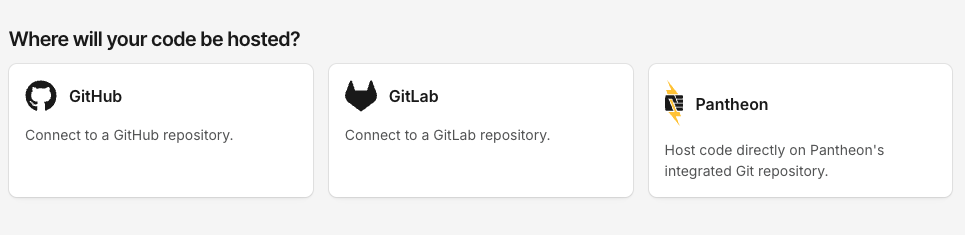
During site creation, select GitLab on the Where will your code be hosted? screen to connect your repository.

Where will your code be hosted screen showing GitHub, GitLab, and Pantheon options

For full setup instructions, see the related documentation.

August 24, 2026

Getting help on Pantheon is now faster and simpler. The Support tab in your dashboard will soon have a single access point for all support requests: start a conversation, describe your issue, and get routed based on your needs.

What's new

One place to get help. The previous ticket options in the dashboard have been replaced by a single, AI-powered conversational entry point on the Support tab. No more sifting through endless menus or categories to choose up front—just describe what you need.

Faster answers. Many common questions are now resolved immediately, any time of day, without waiting for a queued ticket response.

Routing based on your needs. When your request needs hands-on help, it's handed off to the right support team with the context you've already shared—prioritized and categorized automatically—so you don't repeat yourself, and your issue reaches the right people sooner.

Get the best experience: start from your workspace

Support access is tied to your workspace plan. For the fastest, most complete experience, open Support from the workspace you're working in rather than from an individual site. Starting from your workspace ensures you receive the full support benefits of your plan.

What you need to do

Nothing—there's no action required, and any current open tickets are unaffected. Next time you need help, head to the Support tab in your workspace and simply start a conversation with our AI-powered assistant.

Note: You can reach our support team at any time—just ask, and we’ll get you to the right person. Phone support remains available for eligible plans.

Built with your privacy in mind

Support conversations are processed solely to help resolve your request. Your data is not used to train AI models, and our AI providers do not retain or use your data for their own purposes. Support interactions remain subject to Pantheon's existing Privacy Policy and data protection commitments.

August 20, 2026

Terminus 4.3.3 is now available. This release adds a rollbackable column to node:builds:list, a new site_admin role, and automatic session token refresh for long-running commands, along with several bug fixes.

Key improvements in this release

  • rollbackable column for node:builds:list: Surfaces which builds are still eligible for rollback, so you can see rollback eligibility without a separate call. (#2903)
  • New site_admin role: Adds support for the site_admin role. (#2878, #2895)
  • Automatic session token refresh: Terminus now automatically refreshes session tokens that expire during long-running command execution, preventing commands from failing partway through. (#2900)
  • Fixed env:code-log crash on eVCS sites: Guarded against null commit labels that previously caused a crash. (#2911)
  • Fixed plugin installs blocked by composer audit: composer audit.block-insecure is now written directly to composer.json, so plugin installs no longer fail when a pinned dependency has an open security advisory. (#2891)

How to upgrade to Terminus 4.3.3

If you use Homebrew (macOS-only) to manage your Terminus installation, you should upgrade using:

If you installed Terminus directly from the .phar file, you should upgrade using the self:update command:

For more information about this release, visit the GitHub release page.

If you have questions or concerns around Terminus, please use the Terminus issue queue.

August 20, 2026

Integrated Composer runs composer audit on every build to check your dependencies against known security advisories.

  • Dev and Multidev: Builds always succeed, even if advisories are found.
  • Test: Deploying to Test fails if the latest Dev build has open advisories you haven't explicitly acknowledged.
  • Live: Not audited directly, but blocked transitively, since Live only receives code by deploying from Test.

Action required

If a deploy to Test fails because of a security advisory, update the affected package where possible. When you can't update right away, you can tell Composer to stop flagging specific advisories using the config.policy block in composer.json, while keeping a version-controlled record of what you've accepted and why.

See Handling security advisories for how the check works and how to manage your own list of exclusions.